

 Space Waves
Loading game…
Play now

- Rating
- 7.2/10
- Published
- Technology
- HTML5
- Platforms
- desktop&mobile
Space Waves
Space Waves is a fast one-button arcade skill game where you guide a constantly moving arrow through narrow neon tunnels filled with walls, spikes, rotating gears, tight gaps, and other hazards. Hold the control to send the arrow diagonally upward, release it to descend, and keep alternating between the two directions until you reach the finish without touching anything. One collision can end the attempt, so success depends on precise timing, looking ahead, and learning how much movement each press creates.
The basic mechanic takes only seconds to understand, but Space Waves becomes difficult because you cannot simply fly straight. Every hold sends you upward and every release brings you downward, creating the game’s distinctive zigzag motion. Easy sections give you room to find the rhythm; harder layouts shrink the safe spaces until small timing mistakes become enough to crash.
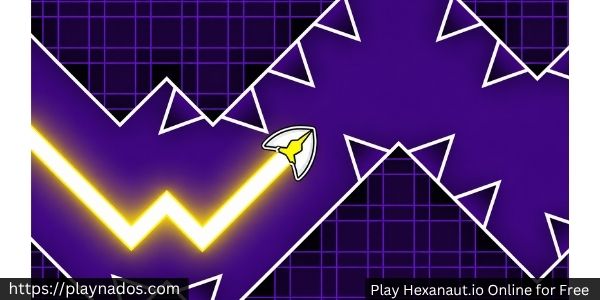
How Space Waves Actually Works
Your arrow moves forward automatically.
You do not control its horizontal speed like a normal racing game.
Your job is to control vertical position.
The basic loop is:
Hold → rise diagonally → release → fall diagonally → repeat
That sounds simple until the tunnel becomes narrow.
If you hold for too long, you hit the ceiling.
If you release too early, you drop into the floor or a spike.
If you react only when your arrow reaches an obstacle, you are usually already too late.
The real skill is predicting where the arrow will be a moment later.
Look Ahead Instead of Watching the Arrow
One of the biggest improvements you can make in Space Waves is changing where you look.
New players often stare directly at their arrow.
That tells you where you are now.
It does not tell you where you need to be next.
Instead, try to keep your attention one or two obstacles ahead.
Before reaching a narrow opening, identify:
- whether you need to enter high or low;
- whether the path rises or falls afterward;
- whether a rotating gear changes the safe timing;
- and how much space you have for the next correction.
Your inputs become much smoother when you decide before arriving at the obstacle.
Short Inputs Beat Panic Clicking
Rapid clicking is not automatically good play.
The goal is not to press as fast as possible.
The goal is to create the exact zigzag shape that fits through the tunnel.
Wide sections can use longer holds and releases.
Tight sections usually need:
- short taps;
- small corrections;
- controlled releases;
- and consistent rhythm.
If you start clicking randomly after getting nervous, the arrow becomes difficult to predict.
Stay deliberate.
Why the Zigzag Rhythm Matters
Because Space Waves gives you only two vertical states—rising and falling—every route becomes a pattern.
A clean run often looks like a sequence of controlled peaks and valleys.
You may need:
long rise → short drop → small rise → longer drop
rather than identical taps throughout the entire level.
Learning to read that rhythm is more important than raw reaction speed.
Once you recognize the pattern of a section, your hands begin preparing for the next movement before the arrow arrives.
Rotating Gears Require Timing, Not Just Position
Static walls are predictable.
Rotating obstacles introduce time.
A gap that looks open when you first see it may be closed when your arrow actually reaches it.
Do not aim only at the current opening.
Watch how the gear rotates.
Then estimate where the safe area will be when you arrive.
Sometimes slowing your vertical movement for half a second creates a much safer entrance.
Trying to force your way through every opening immediately can make the level harder than necessary.
Use Open Sections to Recenter
Wide areas are not just easy parts of the level.
They are opportunities to fix your position.
If you barely survived a difficult section and your arrow is close to the ceiling or floor, use the next open space to return toward a comfortable middle line.
Entering the next obstacle already badly positioned forces you to make a large correction.
Large corrections are harder to control.
Small corrections are safer.
Do Not Hold Too Long Before an Incline
The current Space Waves instructions specifically warn that gliding only moves you downward, so you need to prepare your upward movement before reaching an incline.
This means positioning should begin before the obstacle.
If the tunnel rises sharply, start climbing early.
Waiting until the arrow reaches the slope forces you into a much steeper correction and often sends you directly into the wall.
This is one of the best examples of why anticipation matters more than last-second reflexes.
Stay Low Around Some Circular Hazards
Not every obstacle should be passed through the center.
The current CrazyGames guide specifically recommends staying lower around certain circular spikes rather than trying to climb over them.
The lesson is broader than one obstacle:
choose the path with the most margin.
If the top route gives you almost no correction space while the bottom route is wider, do not choose the harder route simply because it looks faster.
Survival matters more than style.
Difficulty Changes How You Should Play
Space Waves uses visual difficulty indicators to help players choose an appropriate challenge.
Easier stages give you:
- wider corridors;
- more forgiving angles;
- fewer immediate threats;
- and more time to understand the movement.
Harder stages reduce that margin.
You begin seeing:
- narrower gaps;
- denser obstacle combinations;
- harder transitions;
- quicker corrections;
- and sections where one poorly timed hold is enough to end the run.
Do not feel forced to complete everything in numerical difficulty order.
Using easier stages to learn the movement first can make difficult stages far less frustrating.
Classic Mode
Classic is the main level-based experience.
The goal is straightforward:
reach the finish without crashing.
The current CrazyGames version organizes Classic content across multiple worlds and allows players to select challenges rather than forcing one continuous run.
This is where pattern learning matters most.
Each failed attempt teaches you more about the exact layout.
After several runs, a section that originally felt impossibly fast starts becoming predictable.
Endless Mode
Endless Mode removes the normal finish-line objective.
Your goal becomes:
survive as far as possible.
That changes how you think.
In a normal level, memorizing a difficult sequence can carry you through.
In Endless, long-term consistency matters more.
A single careless input after a strong run still ends the attempt.
This makes Endless useful for practicing steady control and chasing personal distance records.
Race Mode
Race Mode adds competition to the same precision movement.
The goal is to reach the finish before the other racers.
Current CrazyGames documentation says the racers are visible during the run, but you do not directly attack or collide with them as combat opponents. If they crash, they disappear, and the race tracker shows relative progress.
The biggest trap is distraction.
Watching another racer instead of the tunnel can cost you the entire run.
Your best strategy remains the same:
survive your own line first.
Practice Difficult Sections Instead of Repeating Everything
When Practice Mode is available, use it intelligently.
If you consistently reach 70% of a level and crash at the same narrow transition, repeating the first 70% teaches you very little.
Practice the problem section.
Learn:
- when to start rising;
- when to release;
- where to position before entering;
- and what the next obstacle requires.
Then return to a normal run.
Current versions of Space Waves include practice/resume-style systems that can reduce the need to restart the entire level while learning a difficult segment.
Controls for Space Waves
Desktop
- Hold Left Mouse Button: Rise
- Hold W: Rise
- Hold Spacebar: Rise
- Release: Descend
- P: Pause
Mobile
- Touch and hold: Rise
- Release your finger: Descend
The current CrazyGames build supports desktop, mobile, and tablet browsers.
The controls are intentionally minimal.
You do not need to memorize combos.
All of the challenge comes from mastering the timing of one movement system.
Build Consistency Before Speed
Space Waves looks like a reflex game, but trying to become faster immediately is often the wrong goal.
First build consistency.
Can you clear the opening five obstacles every time?
Can you enter the difficult section from the same position?
Can you repeat the same zigzag without overcorrecting?
Consistency creates speed naturally because you stop hesitating.
The fastest-looking movement is useless if it crashes.
Break Hard Sections Into Smaller Problems
If one section seems impossible, do not treat it as a single giant obstacle.
Break it down.
For example:
- Enter the first gap low.
- Begin rising immediately.
- Release before reaching the top wall.
- Pass below the gear.
- Use two short taps to center.
- Prepare for the next incline.
Thinking in small decisions is easier than trying to “react faster.”
Use Your Failed Runs as Information
Every crash tells you something.
If you hit the ceiling:
You held too long or started rising too early.
If you hit the floor:
You released too long or began descending too soon.
If you hit the front of a rotating gear:
Your timing was wrong, not necessarily your height.
If you repeatedly miss the same transition:
Your setup before the obstacle may be the actual problem.
Do not immediately restart without understanding why you failed.
One useful observation can save ten identical attempts.
Customization Does Not Change the Core Physics
Current versions include visual customization for the arrow, including different shapes, skins, and colors.
These options can make the game feel more personal, but they do not replace skill.
A new arrow design will not make a difficult tunnel wider.
Your real progression comes from better timing and cleaner movement.
Space Waves and Geometry Dash
Space Waves is often compared with the Wave-style movement associated with Geometry Dash.
The similarity is obvious:
- geometric obstacles;
- fast scrolling;
- precise timing;
- zigzag movement;
- and instant punishment for collisions.
But Space Waves is its own game rather than an official Geometry Dash mode or sequel.
Its focus is built directly around controlling the arrow through dedicated Space Waves stages and modes. CrazyGames itself describes the games as very similar while still listing Space Waves as a separate title from do.games.
Space Waves Unblocked
Space Waves unblocked is mainly a search phrase used by players looking for browser access to the game.
It is not a separate official game mode.
An “unblocked” version should still use the same basic Space Waves mechanic:
hold to rise, release to descend, and avoid every obstacle.
Whether a particular school or workplace network allows a game site depends on that network’s own rules, so there is no universal version that can guarantee access everywhere.
Space Waves Online
Space Waves is designed for quick browser play.
The current CrazyGames version supports desktop, mobile, and tablet browsers, with mobile app versions also listed.
That makes the game particularly suitable for short sessions.
A failed run restarts quickly, so there is very little downtime between attempts.
That instant retry loop is one of the reasons difficult levels remain satisfying instead of feeling slow.

Common Space Waves Mistakes
Watching Only Your Arrow
You react too late to upcoming obstacles.
Better: look ahead along the tunnel.
Holding Until You Reach the Correct Height
Momentum carries you farther than expected.
Better: release slightly before the exact point you want.
Clicking Randomly in Narrow Gaps
Your zigzag becomes unpredictable.
Better: use controlled micro-taps.
Entering Every Obstacle From the Edge
You have almost no correction room.
Better: recenter whenever the tunnel gives you space.
Treating Every Failed Attempt as Bad Luck
You repeat the same mistake.
Better: identify whether the crash came from timing, entry position, or overcorrection.
Watching Racers Instead of the Track
You become distracted during Race Mode.
Better: use rival positions as secondary information and keep your eyes on the next hazard.
Practical Tips for Hard Levels
Start the Move Early
If you already know the next gap is high, begin climbing before reaching it.
Use Micro-Taps in Tight Corridors
Short holds create smaller vertical changes and give you more control.
Memorize Transitions, Not Entire Levels
Focus on where the game changes from one movement pattern to another.
Recenter After a Difficult Dodge
Do not carry a bad position into the next obstacle.
Watch Moving Hazards for One Cycle
Understanding the pattern can be faster than repeatedly crashing into it.
Keep Your Hand Relaxed
Tension leads to over-clicking.
Controlled movement wins difficult stages.
A Strong Beginner Routine
Start with a forgiving level.
Spend the first runs learning how far the arrow moves during:
- a long hold;
- a short tap;
- a long release;
- and several quick alternating taps.
Then move to a harder level.
Do not try to clear it immediately.
Learn the difficult sections individually.
Once you can repeat each part consistently, put the full run together.
That progression is much faster than repeatedly attacking the hardest stage without understanding the movement.
Space Waves FAQ
What is Space Waves?
Space Waves is a one-button arcade skill game where you guide an automatically moving arrow through obstacle-filled tunnels by holding to rise and releasing to descend.
Who made Space Waves?
The current CrazyGames listing credits do.games as the developer. The title was released in April 2024.
When was Space Waves released?
CrazyGames lists the browser release as April 2024.
How do you control Space Waves?
On desktop, hold the left mouse button, W, or Spacebar to rise and release to descend. Press P to pause. On mobile, touch and hold to rise and release to fall.
What is the goal of Space Waves?
Reach the end of the level without touching walls, spikes, rotating gears, or other obstacles.
Is Space Waves difficult?
It starts with more forgiving layouts, but harder stages use tighter spaces and increasingly demanding timing. The difficulty comes from precision rather than complicated controls.
How many levels are in Space Waves?
The classic browser version is widely documented with 33 stages, while the current game has continued receiving updates and now includes multiple worlds and additional modes.
Can I choose the levels myself?
Yes. Level selection lets you choose challenges rather than forcing you to complete every stage strictly in sequence.
Does Space Waves have Endless Mode?
Yes. Endless Mode challenges you to travel as far as possible and set a higher distance score.
Does Space Waves have Race Mode?
Yes. The current version includes Race Mode, where you try to reach the finish before the other visible racers.
Is Space Waves multiplayer?
Race Mode shows other racers, but current CrazyGames documentation describes them as competitors you can see rather than players you directly interact with through combat or collisions.
Is Space Waves similar to Geometry Dash?
Yes, especially in its geometric obstacle design and wave-style zigzag movement, but Space Waves is a separate game rather than an official Geometry Dash title.
What happens when you crash?
Touching a dangerous surface normally ends the attempt and forces you to retry, although Practice or resume options may be available in supported modes.
What is the best strategy for difficult levels?
Look ahead, enter gaps from a controlled position, start vertical movements before reaching the obstacle, and use short taps instead of panic clicking.
Can I play Space Waves on mobile?
Yes. The current CrazyGames version supports mobile and tablet browsers and uses touch-and-hold controls.
Is Space Waves free?
The browser version on CrazyGames is available to play online without purchasing the game upfront.
What does Space Waves Unblocked mean?
It usually refers to accessing Space Waves through a browser-hosted page rather than a separate official version or game mode.
Is Space Waves 2 the same game?
Do not automatically treat pages called Space Waves 2 as the official sequel to Space Waves. The current official/major listing identifies the game simply as Space Waves, so similarly named variants should be handled separately unless their developer and build are verified.
Why do I keep hitting the ceiling?
You are probably holding the control too long or beginning the climb too early. Release sooner and use smaller corrections.
Why do I keep falling before a gap?
Begin the upward input earlier. The arrow cannot move horizontally while maintaining one fixed height, so you need to prepare the zigzag before reaching the opening.
Should I use long holds or short taps?
Both. Long holds are useful when the tunnel gives you space; short taps provide much better control through narrow passages.
Similar Games To Space Waves
Dashmetry — If you enjoy fast rhythm-based reactions, Dashmetry challenges you to time every move carefully while your icon keeps pushing forward automatically.
Level Devil — For a trickier platforming challenge, Level Devil constantly changes the rules with hidden traps, sudden hazards, and unpredictable level behavior.
GunSpin — GunSpin makes recoil the entire movement system, challenging you to time each shot carefully, preserve ammo, and push the weapon farther through the air.


















Comments