
 highway traffic unblocked
Loading game…
Play now

- Rating
- 7.2/10
- Published
- Technology
- HTML5
- Platforms
- desktop&mobile
Highway Traffic Unblocked
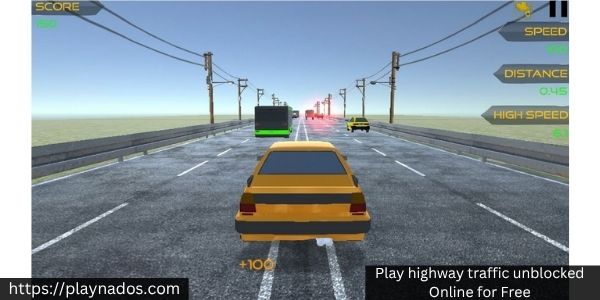
Highway Traffic Unblocked is an endless driving game where the challenge is not beating another racer to a finish line—it is surviving a crowded highway for as long as possible without crashing. Cars fill the lanes around you, traffic can change speed unexpectedly, and every decision becomes more difficult once you start driving faster.
Your score grows as you cover more distance, while close passes and risky overtakes can reward you with extra points. That creates an important choice throughout every run: stay patient and protect your progress, or drive closer to traffic and accept more risk for a stronger score.
Driving Through Traffic Is About Reading Gaps
Highway Traffic looks like a simple car game at first, but successful runs depend heavily on anticipating what other vehicles will do.
Do not focus only on the car directly ahead.
Watch several vehicles at once and look for:
- open space between lanes;
- cars moving noticeably slower than traffic around them;
- vehicles that may block your next lane change;
- safe areas where you can return after an overtake;
- and situations where accelerating would leave you with nowhere to escape.
A gap is useful only if you still have somewhere safe to go afterward.
Changing lanes aggressively without checking the next few seconds of traffic is one of the quickest ways to lose a good run.
How to Play Highway Traffic Unblocked
The basic objective is straightforward:
- Accelerate onto the highway.
- Stay inside a clear lane whenever possible.
- Steer around slower vehicles before you get too close.
- Use braking when traffic becomes crowded.
- Pass vehicles closely when you are confident enough to chase bonus points.
- Keep driving until a collision ends the run.
You do not need to drive at maximum speed constantly.
Knowing when to slow down is just as important as knowing when to accelerate.
Game Controls
Desktop Controls
- W / Up Arrow: Accelerate
- A / Left Arrow: Steer left
- D / Right Arrow: Steer right
- Space: Handbrake
- Left Shift / F: Boost
Some versions can include additional controls or camera options, but these are the main inputs used during a normal run.
Choose the Right Highway Traffic Mode
Highway Traffic gives you several ways to change the challenge.
One Way
Traffic moves in the same general direction as you.
This is the easiest place to learn how the car handles, practice close overtakes, and understand how quickly you need to react at higher speed.
Two Way
Some traffic approaches from the opposite direction.
Passing becomes much more dangerous because entering another lane can place you directly in the path of an oncoming vehicle.
Use this mode once you are comfortable reading several lanes simultaneously.
Time Attack
Instead of focusing only on an endless survival run, you are placed under additional time pressure.
Efficient driving matters because hesitation can become almost as costly as a crash.
Speed Bomb
This mode puts more pressure on maintaining speed and forces you to make decisions faster.
It rewards confident driving but punishes players who accelerate without planning a route through traffic.
Near Misses Can Improve Your Score
Driving safely will keep your run alive, but Highway Traffic also rewards calculated risk.
Passing close to another vehicle without touching it can earn additional points.
The important word is calculated.
Do not deliberately squeeze through every small gap you see.
Try a near miss when:
- both neighboring lanes are visible;
- the vehicle ahead is moving predictably;
- you already know where you will move after passing;
- and your current speed gives you enough control.
Avoid it when several cars are grouped together or another vehicle is blocking your escape lane.
One bonus is never worth ending a long run.
Use Speed as a Tool, Not a Goal
Going faster can help you cover distance and create more exciting overtakes, but high speed also reduces your reaction time.
At lower speed, you have time to correct a poor lane change.
At maximum speed, the same mistake can become impossible to recover from.
A better approach is to vary your pace.
Accelerate when:
- the road ahead is open;
- traffic is spread out;
- you have several clear lanes;
- or you want to complete a safe overtake.
Slow down when:
- several vehicles are grouped together;
- your current lane is closing;
- another vehicle limits your visibility;
- or you cannot clearly identify your next move.
Players who know when not to accelerate often survive longer than players who simply hold the throttle.
When Should You Use Boost?
Boost is useful for quickly building speed, but activating it in dense traffic can remove the small reaction window you still had.
Before boosting, check the road farther ahead than normal.
Use it when:
- Your lane is open.
- Nearby cars are spaced apart.
- You have room to change lanes if necessary.
- You are prepared for the extra speed.
Avoid activating boost immediately before entering a cluster of vehicles.
The fastest route is useless if it ends in a crash two seconds later.
Handbrake and Emergency Corrections
The handbrake can help when your normal steering and braking are no longer enough.
However, it should not become your standard solution for every difficult situation.
Sudden corrections at high speed can leave the car badly positioned for the next vehicle.
Try to avoid emergencies before they happen:
- read traffic early;
- make smaller steering movements;
- brake before the gap disappears;
- and avoid staying directly behind a slow vehicle until the last possible moment.
Smooth decisions are usually safer than dramatic ones.
Cars, Earnings, and Upgrades
Strong runs reward you with money that can be used to improve your driving options.
Instead of every attempt feeling completely separate, your progress can help you unlock additional cars and improve vehicle performance.
Upgrades can affect areas such as:
- speed;
- acceleration;
- handling;
- braking;
- and other performance characteristics depending on the build.
A faster car is not automatically easier to use.
Extra speed means less time to react, so improving handling and learning the vehicle can be just as valuable as chasing maximum performance.
How to Get a Higher Score
A high score comes from combining distance with controlled risk.
Stay Out of Traffic Clusters
When several vehicles are packed closely together, wait for the formation to open instead of forcing your way through.
Plan Two Lane Changes Ahead
Before moving left or right, think about what comes afterward.
Do not move into a lane simply because it is empty right now.
Pass Behind Cars When Possible
If another car is crossing your intended path, letting it move ahead of you often creates a larger and safer opening.
Build Speed on Clear Sections
Open road is the best place to accelerate or boost.
Save your concentration for dense traffic.
Protect Long Runs
The longer you survive, the more valuable your current run becomes.
Once you have built a strong score, unnecessary risks become less attractive.
Common Mistakes That Cause Crashes
Holding Full Acceleration Everywhere
Maximum speed leaves almost no room for correction.
Better: adjust your speed according to traffic density.
Watching Only the Vehicle Ahead
A safe overtake can immediately become dangerous if another car is occupying your destination lane.
Better: scan multiple lanes before moving.
Changing Lanes Too Late
Waiting until you are almost touching the car ahead forces you into an emergency maneuver.
Better: begin planning your overtake earlier.
Boosting Into Heavy Traffic
Boost feels useful when you want to escape a slow section, but it can make an already difficult situation worse.
Better: boost after traffic opens.
Chasing Every Near Miss
Near-miss points are valuable only when you survive afterward.
Better: choose opportunities rather than forcing them.
A Simple Strategy for Longer Runs
Use a repeatable decision process.
Step 1: Find the Clearest Lane
Before accelerating hard, identify the lane with the most space.
Step 2: Watch the Next Obstacle
Look beyond the nearest car and determine what will block you next.
Step 3: Decide Early
Choose whether you will pass left, pass right, or slow down before reaching the vehicle.
Step 4: Make One Smooth Move
Avoid unnecessary back-and-forth steering.
Step 5: Reassess
As soon as the overtake is complete, start reading the next group of traffic.
Following this cycle prevents many of the panic moves that cause crashes.
Highway Traffic Online and Browser Versions
Players searching for Highway Traffic online, Highway Traffic online game, Highway Traffic game unblocked, or unblocked Highway Traffic are usually looking for the browser version of the same traffic-driving experience.
You may also see broader searches such as traffic games unblocked, highway games unblocked, highway driving unblocked, highway racing unblocked, unblocked driving games, or unblocked car games.
Highway Traffic fits naturally into these categories because its entire challenge revolves around controlling a car through continuously changing road traffic.
Highway Traffic Freezenova
Highway Traffic Freezenova refers to the game from FreezeNova, the developer behind this browser driving title.
The game focuses on endless traffic survival rather than a traditional race against opponents.
That distinction is important because searches such as Highway Racer Unblocked, Traffic Racer Unblocked, Highway Racer 2 Unblocked, Highway Driver Unblocked, and Highway Rider Unblocked can refer to other driving games with similar highway themes.
They share traffic and driving mechanics, but they should not automatically be treated as the same game.
Highway Traffic Unblocked GitHub, 76, 77, and 66
Some players search specifically for Highway Traffic Unblocked GitHub, Highway Traffic Unblocked 76, Highway Traffic Unblocked 77, or Highway Traffic Unblocked 66.
These terms normally point toward particular hosting sites, mirrors, or unblocked-game collections rather than separate Highway Traffic modes.
The gameplay itself still revolves around surviving highway traffic, avoiding collisions, increasing your score, and improving your vehicle.
The same applies to Classroom Games Highway Traffic and other platform-specific searches.
Cutting Up in Traffic Searches
Highway Traffic can also appear around searches such as cutting up in traffic games unblocked, cut up games unblocked, traffic road unblocked, traffic rush unblocked, and even No Hesi Unblocked because those searches share an interest in weaving through traffic at speed.
However, they are not all names for the same game.
Highway Traffic has its own modes, vehicles, controls, scoring, and progression. Treat those other phrases as related driving-game searches rather than alternate titles.
Useful Tips Before Your Next Run
- Look beyond the nearest car before changing lanes.
- Leave yourself an escape lane whenever possible.
- Use boost mainly on open highway sections.
- Slow down before traffic becomes completely blocked.
- Make smooth steering corrections instead of rapid left-right inputs.
- Chase near-miss points only when the surrounding lanes are clear.
- Learn how your current car responds before spending every run at maximum speed.
- Use One Way mode to practice before moving into harder traffic conditions.
- In Two Way mode, identify oncoming cars before attempting an overtake.
- Protect a strong score instead of taking unnecessary risks late in a run.
Highway Traffic Unblocked FAQ
What is Highway Traffic Unblocked?
Highway Traffic Unblocked is a browser driving game where you steer through busy highway traffic, avoid collisions, earn points, and try to survive for as much distance as possible.
Who made Highway Traffic?
Highway Traffic was developed by FreezeNova.
How do you control Highway Traffic?
Use W or the Up Arrow to accelerate, A/D or the Left and Right Arrows to steer, Space for the handbrake, and Left Shift or F for boost.
What game modes are available?
Highway Traffic includes One Way, Two Way, Time Attack, and Speed Bomb modes, giving you different traffic conditions and objectives.
How do you earn more points?
Drive farther without crashing and take advantage of safe close passes or near misses when the road layout gives you enough space.
What is the safest way to overtake traffic?
Check both the vehicle ahead and the lane you want to enter, begin the maneuver early, and avoid moving until you know there is enough space to complete the pass.
Should I use boost whenever it is available?
No. Boost is most useful when the road ahead is clear. Using it inside dense traffic gives you much less time to react.
Can you unlock more cars?
Yes. Progress and earnings can be used toward additional vehicles and upgrades depending on the game build.
Is Highway Traffic the same as Highway Racer 2?
No. Highway Racer 2 is a different driving game. The games have similar highway-driving themes but should not be treated as the same title.
What does Highway Traffic Unblocked 76 mean?
It generally refers to a particular unblocked-game website or collection. It is not a special mode inside Highway Traffic.
What is Highway Traffic Unblocked GitHub?
That search normally refers to players looking for a GitHub-hosted or mirrored browser version rather than a different Highway Traffic game.
Is Highway Traffic an endless game?
Normal Highway Traffic gameplay is built around continuing through traffic and improving your score until a collision ends the run, although some modes add different conditions such as time pressure.
What is the best mode for beginners?
One Way is a good place to learn steering, braking, traffic spacing, and near-miss timing before attempting more demanding traffic patterns.
Similar Games To highway traffic unblocked
Traffic Rally — If you enjoy weaving through busy roads, Traffic Rally turns speed, lane control, and quick overtakes into a constant driving challenge.
Acceleration City — For a more open driving experience, Acceleration City lets you explore a large environment, test different vehicles, and take on varied driving challenges.















Comments